See Your Book's World on One Canvas
Place your character, location, note and quote cards freely, then show how they connect with arrows, pen strokes and regions. Plan your plot, lay out your scenes and catch your world's mood at a glance.
Your Ideas, Finally in One Place
With images on your phone, notes in a notebook and characters in a document, the whole world is hard to see. Boards gather it all on one canvas, connected to your book's entries.
Scattered Inspiration
- Images and screenshots lost in your phone's gallery
- Sticky notes on the wall with no tie to your book
- Characters in one place, the plot in another
- The same world rebuilt in every new tool
Boards
- Entry, note and quote cards come straight from your book
- Images, sticky notes and sketches on the same canvas
- Links between your entries show up on the board on their own
- The same board on the web and in the app, every change saved automatically
Everything You Need to Build Your World
Entry, Note and Quote Cards
Add your characters, locations, groups, notes and quotes to the board as cards. Each card stays linked to its entry in your book.
Images and Sticky Notes
Upload your own images and build your mood board with sticky notes, text, shapes, speech bubbles and stickers.
Arrows and Relationships
Connect cards with arrows and label them. Relationships from your book show up between cards as faint lines on their own.
Draw with the Pen
Sketch routes, marks and ideas freely, pick a color and fix things with the eraser. On iPad you can draw right away with a stylus.
Regions
Group your cards in colored regions: scenes, acts, character groups or parts of a map.
The Same Board Everywhere
The same board on the web, iPhone and iPad, Mac and Android. Every change you make is saved automatically.
A Board for Every Writer
Plot Board
Lay out your scenes and turning points, connect them with arrows and spot the gaps in your story.
Character Relationship Map
Put character cards side by side and mark alliances, rivalries and secrets with arrows.
Inspiration and Mood Board
Capture your book's atmosphere at a glance with images, colors and quotes.
World Map
Place your locations on the canvas and draw the roads and routes between them.
Chapter Plan
Plan your chapters with sticky notes and group scenes in regions.
Research Board
Keep your notes, reference images and half-formed ideas in one place.
How to Create a Board
Open Boards
Go to Boards in your book's sidebar and create a new board. A book can have several boards.
Add Your Cards
Add your entries, notes and quotes, then round them out with images, sticky notes and text.
Connect and Draw
Connect with arrows, draw with the pen and group with regions. The board saves every change on its own.
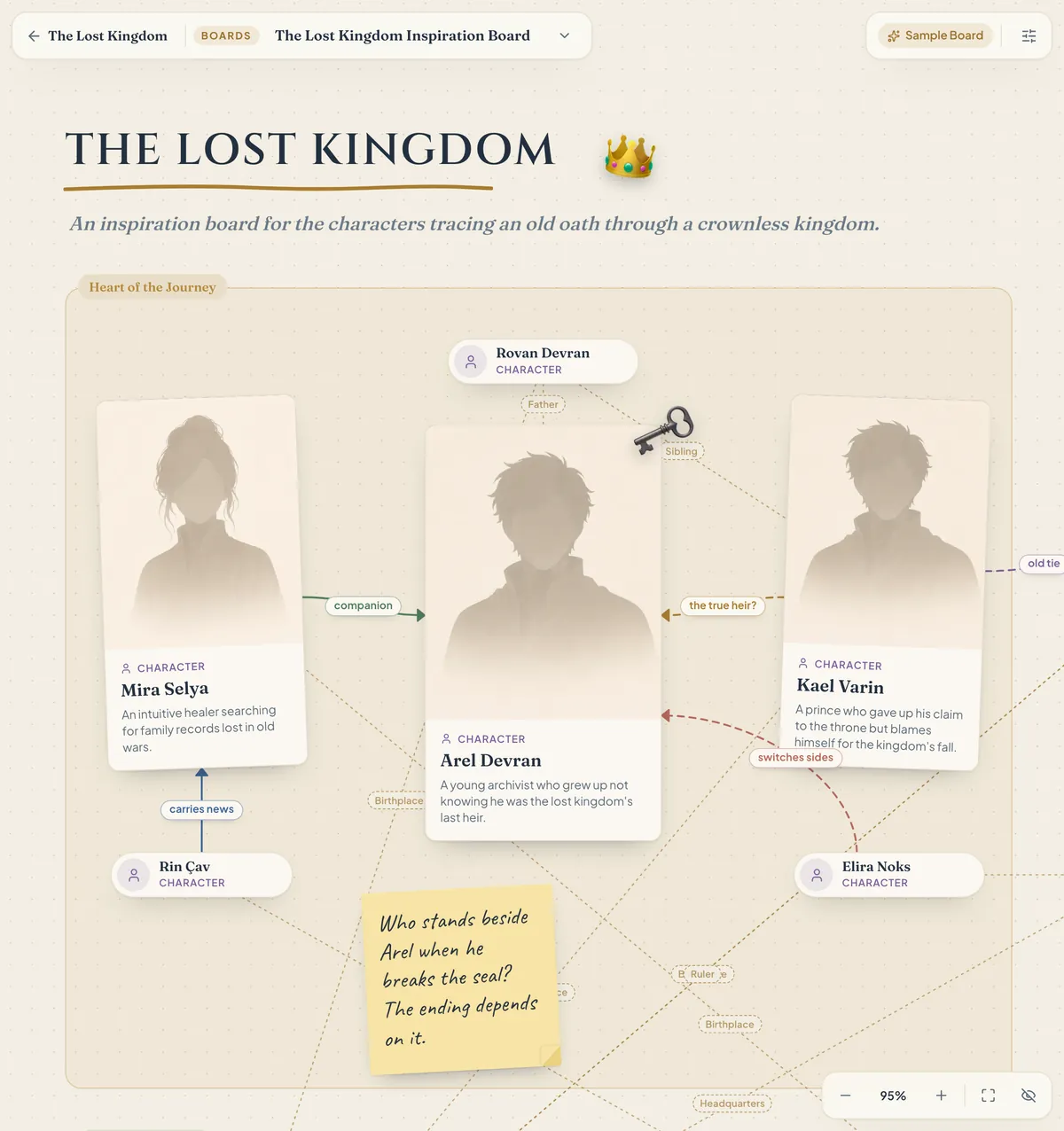
The Lost Kingdom Inspiration Board
This board from the Sample Book brings characters, political tension, secrets, a map and the plot together on one canvas. Once you sign up for free, you can explore it yourself in the Sample Book in your library.
Boards Are Free for Every Writer
Boards are available on both plans. You can create as many boards as you like in a book (within fair use), and images you upload to a board use your plan's image storage.
Frequently Asked Questions About Boards
Yes, Boards are free for every writer. You can create as many boards as you like in a book (within fair use). Images you upload to a board use your plan's image storage.
Yes. You can open and edit your boards in the iPhone, iPad, Mac and Android app, just like on the web. For the most comfortable experience we recommend a larger screen, like a tablet or a computer.
Yes. You can draw with a stylus even without picking the pen tool, and scroll the canvas with your finger. Your palm resting on the screen won't spoil the line.
Yes. Character, location, note and quote cards come from your book's entries, so a card shows the latest details when you update the entry. Relationships between your entries appear between cards as faint lines on their own.
No. Your boards are visible only to you; even if you turn on your Shareable Wiki, boards are not published there. The text you write on a board is stored encrypted.
The board saves every change on its own. If you edit the same board in two places, you choose which version to keep, and you can also save your version as a new board.
Build Your World on One Canvas
Connect your characters, notes and ideas, and map out your book. Boards are ready to use with your free account.